前面讲完了 wal 的核心设计原理和代码实现,这个组件是 rosedb 的重要组成部分,所以在学习或者使用 rosedb 的时候,对这个组件都需要能够融会贯通。
在 wal 组件之上,我们就可以向 wal 写入数据或者读取数据,这一节就来看看 rosedb 在写入、删除和读取数据时的核心流程以及代码实现。
Batch 概述
需要说明的是 rosedb 在写入数据的时候,实际是建立在 Batch 接口之上,Batch 可以理解是一个批量写入接口,所以我们可以先来看一下 Batch 接口的实现。
Batch 其实有点类似于事务,但是并没有提供事务的隔离性,只不过 Batch 中写入的数据能够保证原子性,也就是说一个 Batch 的数据要么全部写入成功,要么全部失败回滚,不会停留在某个中间状态。
写入数据的时候,可能前后会有多个 Batch,每个 Batch 的数据怎么各自区分呢?
我们使用了一个 batchId 进行区分,batchId 是全局唯一的,每个批量的数据在写入的时候都会有一个对应的 batchId(可以认为 batchId 类似事务版本号)。
例如我们写入了两个 Batch 的数据,batchId 分别是 101 和 102,那么写入到 wal 文件中的数据就会按照同样的顺序来进行组织。
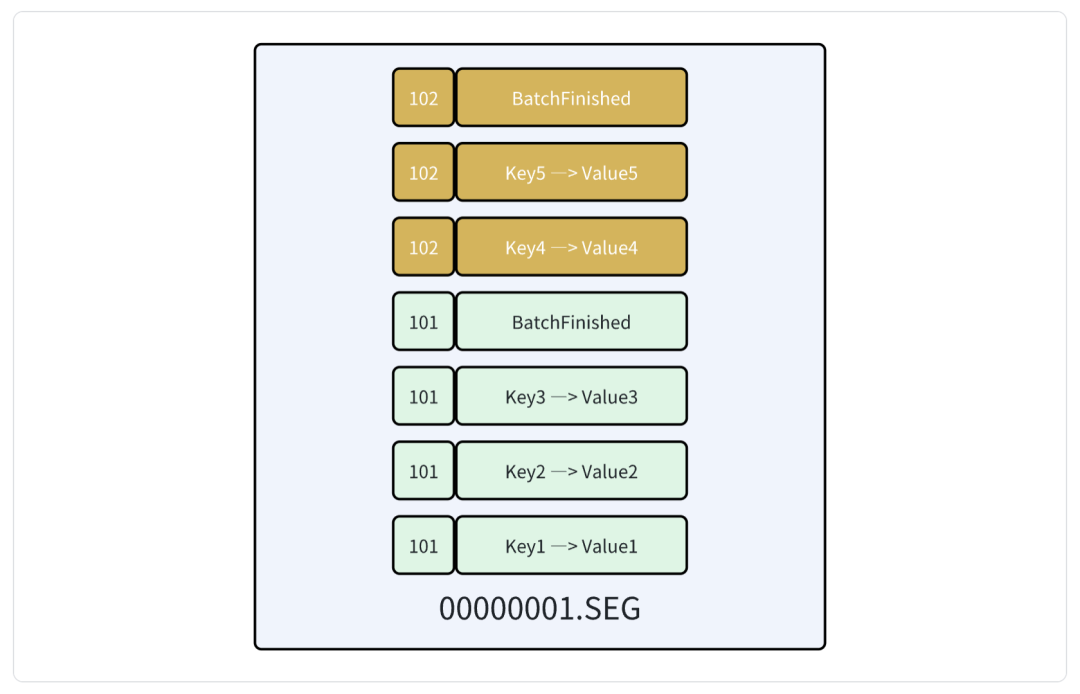
例如这里 batch 101 写入了三条数据,分别是 key1、key2、key3,batch 102 写入了两条数据,分别是 key4 和 key5。
注意这里我们在每个 batch 的最后还多写了一条特殊的数据,用于表示 batch 的结束。
这样做的目的是为了保证 batch 数据的原子性,例如我们向 batch 中写入了 10 条数据,但是在向磁盘写到第 5 条的数据出现了异常,那么我们在重启的时候,并没有一种方式能够知道哪些数据是成功写入的。
所以在 batch 的末尾加上一条特殊数据,数据库启动建立索引的时候,需要对这些数据进行遍历,只有读取到这一条标识 Batch 完成的特殊数据的时候,才认为整个 batch 是有效的,否则认为这个 Batch 的数据是无效的,则直接全部丢弃。
初始化 Batch
初始化 Batch 可以传递参数配置,目前有两个配置:
1
2
3
4
5
6
7
| // BatchOptions specifies the options for creating a batch.
type BatchOptions struct {
// Sync has the same semantics as Options.Sync.
Sync bool
// ReadOnly specifies whether the batch is read only.
ReadOnly bool
}
|
ReadOnly 表示 Batch 是否是只读的,如果是的话,则 Batch 中只能进行类似 Get 的读取数据的操作,Put、Delete 这种增删数据操作是不允许的。
Sync 表示是否每次操作都将操作系统缓冲区的内容刷到磁盘。
1
2
3
4
5
6
7
8
9
| // Sync is whether to synchronize writes through os buffer cache and down onto the actual disk.
// Setting sync is required for durability of a single write operation, but also results in slower writes.
//
// If false, and the machine crashes, then some recent writes may be lost.
// Note that if it is just the process that crashes (machine does not) then no writes will be lost.
//
// In other words, Sync being false has the same semantics as a write
// system call. Sync being true means write followed by fsync.
Sync bool
|
然后会初始化 batchId 的生成器,这里使用到了一个第三方库 snowflake https://github.com/bwmarrin/snowflake
,实际上实现了 Twitter 的雪花算法,能够生成唯一的 ID 标识。
 1
 2
 3
 4
 5
 6
 7
 8
 9
10
11
12
13
14
15
16
17
18
| // NewBatch creates a new Batch instance.
func (db *DB) NewBatch(options BatchOptions) *Batch {
batch := &Batch{
db: db,
options: options,
committed: false,
rollbacked: false,
}
if !options.ReadOnly {
node, err := snowflake.NewNode(1)
if err != nil {
panic(fmt.Sprintf("snowflake.NewNode(1) failed: %v", err))
}
batch.batchId = node
}
batch.lock()
return batch
}
|
Batch 写入
初始化一个 Batch 之后,就可以调用其中的方法对数据进行读写了。
顾名思义 Batch 数据写入的时候,可以写入多条数据(批量),因此每次 Put 数据的时候,实际上只是将其存放到一个临时的数组当中,这里叫做 pendingWrites。
1
2
3
4
5
6
7
8
| // write to pendingWrites
var record = b.lookupPendingWrites(key)
if record == nil {
// if the key does not exist in pendingWrites, write a new record
// the record will be put back to the pool when the batch is committed or rollbacked
record = b.db.recordPool.Get().(*LogRecord)
b.appendPendingWrites(key, record)
}
|
这里首先会根据 key 从数组中查找,如果已经包含了同名的 key 数据,则直接覆盖原来的值即可。例如在一个 Batch 中,先写入了 k1 = v1,然后又写入了 k1 = v2,那么我们只需要保留数据的最新值 v2 即可,不用重复写入两条数据。
如果不存在的话则会 append 一条新的数据到数组中。
这里写入的数据用结构体 LogRecord 表示,分别包含数据的 key、value、type 类型、batchId、expire 过期时间。
 1
 2
 3
 4
 5
 6
 7
 8
 9
10
| // LogRecord is the log record of the key/value pair.
// It contains the key, the value, the record type and the batch id
// It will be encoded to byte slice and written to the wal.
type LogRecord struct {
Key []byte
Value []byte
Type LogRecordType
BatchId uint64
Expire int64
}
|
这里的类型主要分为了三种,分别是:
- LogRecordNormal:表示 Put 的数据
- LogRecordDeleted:表示被 Delete 的数据(类似论文中提到的墓碑值)
- LogRecordBatchFinished:表示 batch 结束的特殊数据
1
2
3
4
5
6
7
8
| const (
// LogRecordNormal is the normal log record type.
LogRecordNormal LogRecordType = iota
// LogRecordDeleted is the deleted log record type.
LogRecordDeleted
// LogRecordBatchFinished is the batch finished log record type.
LogRecordBatchFinished
)
|
Batch 删除
删除数据的逻辑和 Put 基本类似,因为我们知道 bitcask 模型的文件是 append-only 的,也就是说不能去更新文件中的数据,而是只能追加写入。所以删除实际上就是写入一条新的数据,并且标识类型是 LogRecordDeleted。
 1
 2
 3
 4
 5
 6
 7
 8
 9
10
11
12
13
14
15
| var exist bool
var record = b.lookupPendingWrites(key)
if record != nil {
record.Type = LogRecordDeleted
record.Value = nil
record.Expire = 0
exist = true
}
if !exist {
record = &LogRecord{
Key: key,
Type: LogRecordDeleted,
}
b.appendPendingWrites(key, record)
}
|
Batch 读取
再来看一下读取数据。
在 Batch 中读取数据,首先会读取临时数组 pendingWrites 中的内容。比如我们在一个 Batch 中新写入了 k1 = 100,但是并没有提交,也就是说还没有写入到 wal 文件当中,但是在当前 Batch 中来读取这条数据,也依然能够读取得到。
如果没有获取到的话,则会根据 key 从索引中进行读取,索引中存放到的是数据在 wal 文件中的位置,也就是上一节内容中提到的 wal 组件里的 ChunkPosition。
 1
 2
 3
 4
 5
 6
 7
 8
 9
10
11
| // ChunkPosition represents the position of a chunk in a segment file.
// Used to read the data from the segment file.
type ChunkPosition struct {
SegmentId SegmentID
// BlockNumber The block number of the chunk in the segment file.
BlockNumber uint32
// ChunkOffset The start offset of the chunk in the segment file.
ChunkOffset int64
// ChunkSize How many bytes the chunk data takes up in the segment file.
ChunkSize uint32
}
|
拿到索引之后便能够从 wal 中读取数据了:
1
2
3
4
5
6
7
8
9
| // get key/value from data file
chunkPosition := b.db.index.Get(key)
if chunkPosition == nil {
return nil, ErrKeyNotFound
}
chunk, err := b.db.dataFiles.Read(chunkPosition)
if err != nil {
return nil, err
}
|
Batch 提交
Batch 提交数据,实际上就是将临时数组中的内容写入到 wal 文件中,然后更新内存索引,主要逻辑在方法 Commit 中。
首先会遍历 pendingWrites 数组中的内容,填充 BatchId,然后进行编码,调用 wal 的方法 PendingWrites 写入。
不要忘记最后我们写入了一条特殊的数据用于表示 Batch 的结束,这个 LogRecord 的类型是 LogRecordBatchFinished。
 1
 2
 3
 4
 5
 6
 7
 8
 9
10
11
12
13
14
15
16
17
18
19
20
21
22
| batchId := b.batchId.Generate()
now := time.Now().UnixNano()
// write to wal buffer
for _, record := range b.pendingWrites {
buf := bytebufferpool.Get()
b.buffers = append(b.buffers, buf)
record.BatchId = uint64(batchId)
encRecord := encodeLogRecord(record, b.db.encodeHeader, buf)
b.db.dataFiles.PendingWrites(encRecord)
}
// write a record to indicate the end of the batch
buf := bytebufferpool.Get()
b.buffers = append(b.buffers, buf)
endRecord := encodeLogRecord(&LogRecord{
Key: batchId.Bytes(),
Type: LogRecordBatchFinished,
}, b.db.encodeHeader, buf)
b.db.dataFiles.PendingWrites(endRecord)
// write to wal file
chunkPositions, err := b.db.dataFiles.WriteAll()
|
在这段逻辑中我们需要注意几个点。
一是对数据进行编码,我们知道 pendingWrites 中缓存的数据实际上是 LogRecord 结构体,但是在写入数据到 wal 的时候,需要传递字节数组类型,所以这里需要对数据进行二进制编码。
大致的编码逻辑如下:
 1
 2
 3
 4
 5
 6
 7
 8
 9
10
11
12
13
14
15
16
17
18
19
20
21
22
23
24
25
26
27
| // +-------------+-------------+-------------+--------------+---------------+---------+--------------+
// | type | batch id | key size | value size | expire | key | value |
// +-------------+-------------+-------------+--------------+---------------+--------+--------------+
//
// 1 byte varint(max 10) varint(max 5) varint(max 5) varint(max 10) varint varint
func encodeLogRecord(logRecord *LogRecord, header []byte, buf *bytebufferpool.ByteBuffer) []byte {
header[0] = logRecord.Type
var index = 1
// batch id
index += binary.PutUvarint(header[index:], logRecord.BatchId)
// key size
index += binary.PutVarint(header[index:], int64(len(logRecord.Key)))
// value size
index += binary.PutVarint(header[index:], int64(len(logRecord.Value)))
// expire
index += binary.PutVarint(header[index:], logRecord.Expire)
// copy header
_, _ = buf.Write(header[:index])
// copy key
_, _ = buf.Write(logRecord.Key)
// copy value
_, _ = buf.Write(logRecord.Value)
return buf.Bytes()
}
|
主要是借助了 Go 自带的 binary 包进行编码,编码后的数据分为了几个部分,分别是
- type:类型,占 1 字节
- Batch Id:uint64 类型,在编码的时候为了节省空间使用变长类型(如果使用固定的 8 字节当然也可以表示,但是假如 BatchID 是 1,那么实际上只需要 1 个字节就能表示,使用 8 字节就是空间浪费,在 Go 语言中为了这种特殊的变长编码,会存储一些额外的辅助信息,所以最大的 uint64 变长编码占据的长度是 10 字节)
- key size:key 的长度,uint32 类型,也是变长编码
- value size:value 的长度,uint32 类型,变长编码
- expire:过期时间,int64 类型,变长编码
- key:实际用户存储的 key 数据
- value:实际用户存储的 value 数据
第二个注意的点是,我们这里使用了 wal 的批量写入接口,这样只需要执行一次写入操作就能够将数据全部写入(通过方法 WriteAll)。
通过 wal 写入之后,就拿到了索引数据,就是 chunkPositions 中的内容。
1
2
3
4
5
6
| // write to wal file
chunkPositions, err := b.db.dataFiles.WriteAll()
if err != nil {
b.db.dataFiles.ClearPendingWrites()
return err
}
|
然后就需要更新索引,rosedb 中的索引使用的是 Google 开源的 BTree,https://github.com/google/btree 。
1
2
3
4
5
6
7
| // write to index
for i, record := range b.pendingWrites {
if record.Type == LogRecordDeleted || record.IsExpired(now) {
b.db.index.Delete(record.Key)
} else {
b.db.index.Put(record.Key, chunkPositions[i])
}
|
更新索引实际上就是根据 LogRecord 的操作类型,如果是普通类型则使用 Put 方法插入(或更新)key 对应的索引,如果是删除操作则调用索引的 Delete 方法删除 key 对应的数据。
Batch 回滚
当在 Batch 中写入一些数据之后,可以选择不提交,而是直接丢弃,那么所有的数据都不会写入到 wal 文件中。
这是通过回滚方法实现的,大致逻辑在 Rollback 方法中,主要就是清理掉临时数组 pendingWrites 中的内容。
 1
 2
 3
 4
 5
 6
 7
 8
 9
10
| if !b.options.ReadOnly {
// clear pendingWrites
for _, record := range b.pendingWrites {
b.db.recordPool.Put(record)
}
b.pendingWrites = b.pendingWrites[:0]
for key := range b.pendingWritesMap {
delete(b.pendingWritesMap, key)
}
}
|
DB 数据操作接口
如果在操作数据的时候,并不想使用 Batch 接口,其实也可以直接调用 DB 实例的方法,这些方法名和 Batch 中的一样,只是对 Batch 做了一个简单的封装,以 Put 为例:
 1
 2
 3
 4
 5
 6
 7
 8
 9
10
11
12
13
14
15
16
17
18
19
| // Put a key-value pair into the database.
// Actually, it will open a new batch and commit it.
// You can think the batch has only one Put operation.
func (db *DB) Put(key []byte, value []byte) error {
batch := db.batchPool.Get().(*Batch)
deferfunc() {
batch.reset()
db.batchPool.Put(batch)
}()
// This is a single put operation, we can set Sync to false.
// Because the data will be written to the WAL,
// and the WAL file will be synced to disk according to the DB options.
batch.init(false, false, db)
if err := batch.Put(key, value); err != nil {
_ = batch.Rollback()
return err
}
return batch.Commit()
}
|
实际上相当于是打开一个 Batch 然后只写入了一条数据。
这里做了一个简单的优化,那就是 Batch 结构体实际上可以进行复用,因为打开 Batch 还需要初始化一些结构体,如果频繁调用的情况下,可能会导致内存分配频繁,我们可以借助池化的概念将 Batch 进行缓存,这样每次都能够从 Batch Pool 中获取。
只不过需要注意的是每次 Batch 使用完之后,都需要进行 reset,也就是将一些临时数据进行清理,这样不会对下次使用造成影响。
 1
 2
 3
 4
 5
 6
 7
 8
 9
10
11
12
| func (b *Batch) reset() {
b.db = nil
b.pendingWrites = b.pendingWrites[:0]
b.pendingWritesMap = nil
b.committed = false
b.rollbacked = false
// put all buffers back to the pool
for _, buf := range b.buffers {
bytebufferpool.Put(buf)
}
b.buffers = b.buffers[:0]
}
|
广告区:
《从零实现 KV 存储》,使用 Rust 和 Go 两种语言实现,手把手教学,只需要基础的语法知识,即可学会一个硬核实战项目!
《从零实现 SQL 数据库》,使用 Rust 手写一个数据库系统,超级硬核,Rust 实战项目首选!
课程详情:https://roseduan.cn/course/