Merge 操作是 bitcask 模型中描述的清理文件中的无效数据,rosedb 中的 Merge 操作基本按照 bitcask 模型的流程进行处理。
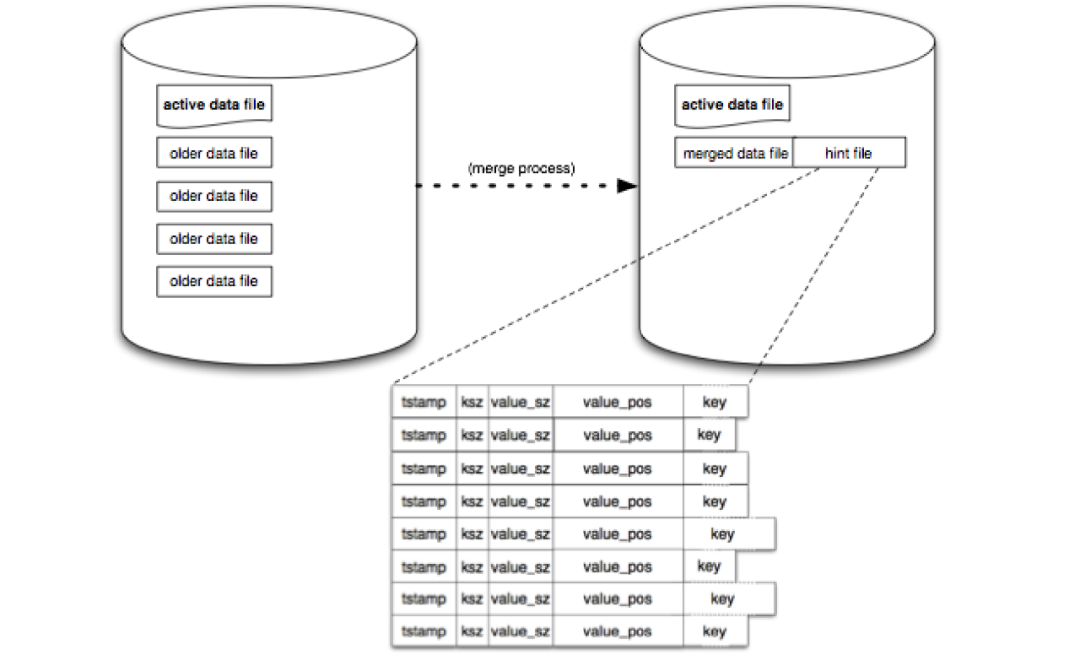
首先需要理解为什么会有无效数据存在,前面说过 rosedb 中的数据文件的写入、删除都是 append-only 的,也就是说永远不会去修改旧的数据。那么在数据库运行的过程中,如果发生了数据的覆盖,或者是删除等,都会导致一些无效的数据残留在文件中。
例如我们先后依次写入了 k = 100,k= 200,k = 300,并且写入了 x = 100,然后执行了删除 x 的操作。
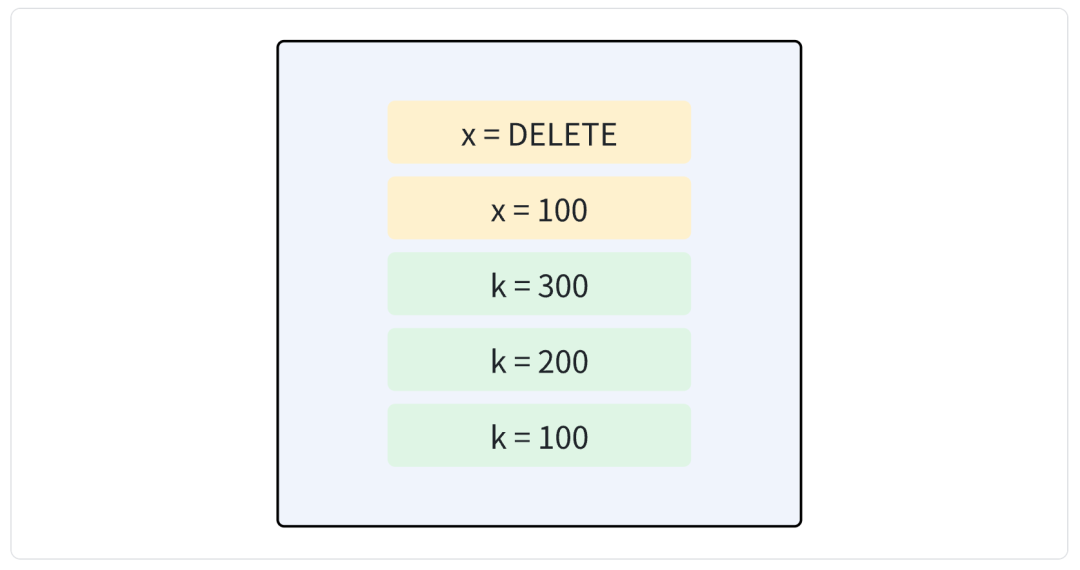
这时候文件中已经存在了 5 条 LogRecord 信息,但是实际上 k 的最新的值是 300,那么其旧值就没有必要存在了,可以进行清理。并且 x 已经被删除了,但是仍然有两个 LogRecord 记录在了文件中,这也是可以清理掉的。
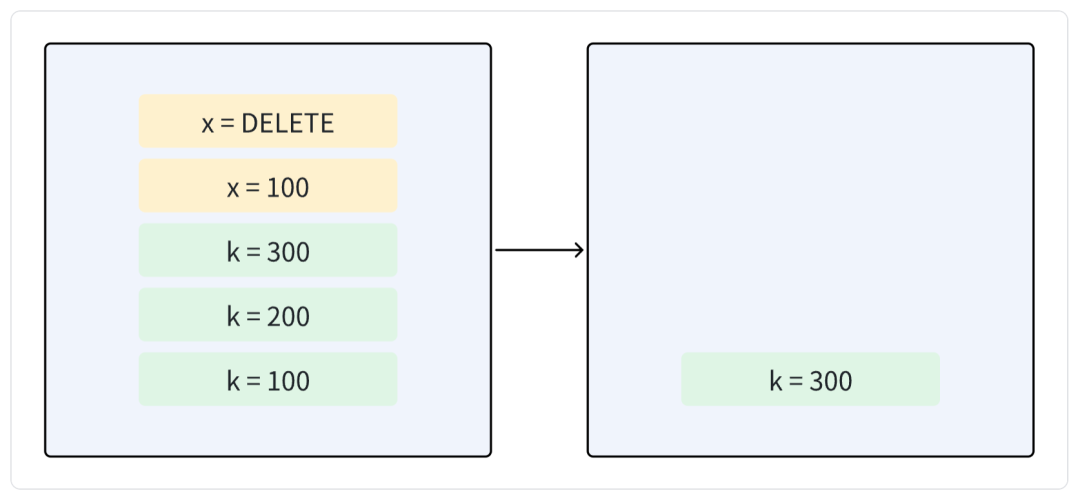
所以 Merge 的过程实际上就是将有效的数据进行重写,这样就能够保证文件中写入的数据一定是最新的,然后删除掉旧的文件,这时候就完成了无效数据清理的流程。
在 Merge 的过程中,还会生成一个 HINT 文件,这个文件中只包含 key+索引信息,而不包含 value 信息,这样可以在启动的时候加载 HINT 文件直接加载索引,而不需要读取整个 value,是为了启动加速而做的优化。
具体到代码实现,首先会打开一个新的 Segment 文件用于写入,例如原来的 Segment 文件列表是 0-5,这时候打开新的文件 6 作为活跃文件,那么 0-5 文件都是能够进行 Merge 操作的了。
1
2
3
4
5
6
7
| prevActiveSegId := db.dataFiles.ActiveSegmentID()
// rotate the write-ahead log, create a new active segment file.
// so all the older segment files will be merged.
if err := db.dataFiles.OpenNewActiveSegment(); err != nil {
db.mu.Unlock()
return err
}
|
然后会打开一个新的 DB 实例,如果当前 DB 实例的路径是 /tmp/db/rosedb_merge_test,那么会在同级之下建立一个新的临时目录,目录名称是在原有的目录上以 -merge 结尾,例如下面这样:

打开的 DB 实例就在这个 -merge 的临时目录打开,这里叫做 mergeDB:
1
2
3
4
5
6
7
8
9
| // open a merge db to write the data to the new data file.
// delete the merge directory if it exists and create a new one.
mergeDB, err := db.openMergeDB()
if err != nil {
return err
}
defer func() {
_ = mergeDB.Close()
}()
|
然后遍历当前 DB 实例的所有数据文件,这里调用了 wal 组件的遍历方法。
1
2
3
4
5
6
7
| chunk, position, err := reader.Next()
if err != nil {
if err == io.EOF {
break
}
return err
}
|
从 wal 文件中读取每一条数据,并且取出其中的 key,然后和内存索引中进行对比,如果是相等的,则说明是一条有效的数据,则进行重写。
 1
 2
 3
 4
 5
 6
 7
 8
 9
10
11
12
13
14
15
16
17
| if indexPos != nil && positionEquals(indexPos, position) {
// clear the batch id of the record,
// all data after merge will be valid data, so the batch id should be 0.
record.BatchId = mergeFinishedBatchID
// Since the mergeDB will never be used for any read or write operations,
// it is not necessary to update the index.
newPosition, err := mergeDB.dataFiles.Write(encodeLogRecord(record, mergeDB.encodeHeader, buf))
if err != nil {
return err
}
// And now we should write the new position to the write-ahead log,
// which is so-called HINT FILE in bitcask paper.
// The HINT FILE will be used to rebuild the index quickly when the database is restarted.
_, err = mergeDB.hintFile.Write(encodeHintRecord(record.Key, newPosition))
if err != nil {
return err
}
|
需要注意这里如果 LogRecord 类型不是 LogRecordNormal 的话,例如是被删除的数据,或者是已经过期的数据,那么也会直接过滤掉。
这里在写入的时候,是写入到了临时的 mergeDB 当中,并且将索引数据写入到了 HINT 文件当中。
1
2
3
4
| // And now we should write the new position to the write-ahead log,
// which is so-called HINT FILE in bitcask paper.
// The HINT FILE will be used to rebuild the index quickly when the database is restarted.
_, err = mergeDB.hintFile.Write(encodeHintRecord(record.Key, newPosition))
|
还需要注意一个问题是,如果在数据量较大的情况下,merge 操作可能是很漫长的,如果中途发生了错误,我们有什么办法可以判断呢?
还是和 Batch 的处理类似,我们可以在 merge 操作结束之后,再写入一个新的文件,这个文件的内容可以写最大的参与 merge 的文件 ID,假如这次 merge 操作的文件 id 是 0-5 ,那么就可以记录 5。
merge 过程中,新插入的数据,例如可能是 6-7,这样可以在启动的时候帮助我们过滤哪些文件是 merge 过的,这样可以直接从 HINT 文件加载索引,否则就从数据文件中加载索引。
 1
 2
 3
 4
 5
 6
 7
 8
 9
10
11
12
13
14
15
| // After rewrite all the data, we should add a file to indicate that the merge operation is completed.
// So when we restart the database, we can know that the merge is completed if the file exists,
// otherwise, we will delete the merge directory and redo the merge operation again.
mergeFinFile, err := mergeDB.openMergeFinishedFile()
if err != nil {
return err
}
_, err = mergeFinFile.Write(encodeMergeFinRecord(prevActiveSegId))
if err != nil {
return err
}
// close the merge finished file
if err := mergeFinFile.Close(); err != nil {
return err
}
|
这个文件记录完成之后,整个 merge 操作就结束了。
大家可能还会注意到一个问题,那就是我们只重写了数据,临时的目录还在,旧的文件并没有删除掉,什么时候才会去做这一步的清理呢?
其实有两种办法,第一种是在 DB 启动的时候,会加载 merge 相关的文件,然后去做旧文件删除和替换。
另一种是,如果 merge 结束之后,想要立即清理旧的文件,那么可以在 Merge 方法中传入参数 reopenAfterDone 为 true,这样就会 merge 之后立即清理文件。
 1
 2
 3
 4
 5
 6
 7
 8
 9
10
11
12
13
14
15
16
17
18
19
20
21
22
23
24
25
26
27
28
29
30
31
32
33
34
| func (db *DB) Merge(reopenAfterDone bool) error {
if err := db.doMerge(); err != nil {
return err
}
if !reopenAfterDone {
return nil
}
db.mu.Lock()
defer db.mu.Unlock()
// close current files
_ = db.closeFiles()
// replace original file
err := loadMergeFiles(db.options.DirPath)
if err != nil {
return err
}
// open data files
if db.dataFiles, err = db.openWalFiles(); err != nil {
return err
}
// discard the old index first.
db.index = index.NewIndexer()
// rebuild index
if err = db.loadIndex(); err != nil {
return err
}
return nil
}
|
只不过立即清理的话会带来一个副作用,那就是立即清理文件的话,会扫描新的文件去重建索引,如果是数据量较大的情况,可能会消耗较长的时间。